
Nice Wallpaper 4K
TVH StudioLibraries & Demo
0.00.00 Reviews
- Version
- 22.0.0
- Installs
- 50.00K
- Age Rating
- Everyone
Screenshots
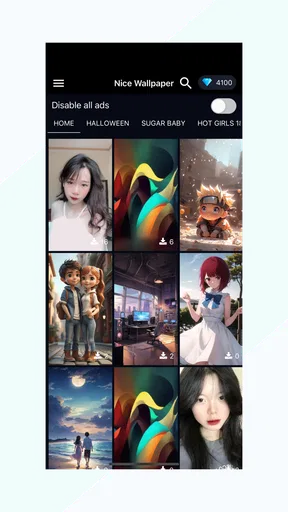
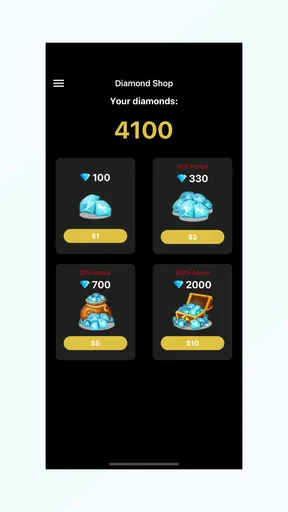
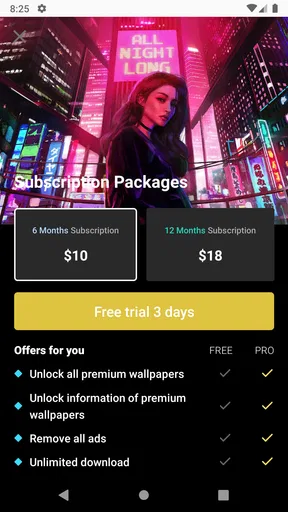
Our Review of Nice Wallpaper 4K
 Analysis by Appyee
I like the idea behind Nice Wallpaper 4K because changing a phone’s background is a small tweak that can make the device feel more personal. The app is in the wallpaper-focused corner of the Libraries & Demo category, and its central appeal is simple: choose an image and use it to refresh the screen, including when the phone is locked. That narrow purpose can be useful if I want a visual change without getting into launchers or complicated home-screen setups.
What the free access does—and does not—tell me
The app is free to install, which makes trying it a low-commitment way to see whether its wallpaper selection suits your taste. There are also in-app purchases, with items priced from $0.49 to $17.99. I’d treat those as optional spending rather than assume that paying is necessary to use the basic wallpaper-changing idea. The range is wide enough that I’d check what a particular purchase includes before buying; a price alone doesn’t tell me how many images or what kind of access it provides.
That distinction matters with wallpaper apps. A free download can be enough for someone who changes a background now and then, while a purchase only makes sense if it adds something you genuinely want. I wouldn’t pay simply because an image looks attractive in a preview. First, I’d make sure it fits my screen, works with the icons and text I keep visible, and is one I expect to enjoy seeing every day.
Where a lock-screen wallpaper earns its space
The lock screen is often the first thing I see when I pick up my phone, so a suitable image can make the device feel less generic. I’d use a calmer picture there if notifications and the clock need to remain easy to read, then choose a more detailed image for the home screen if the app’s setup allows it. The useful decision is not only which image looks best full-screen, but which one still works behind the information I actually need.
For example, if I’m heading out and want a quick mood lift, I could choose a bright outdoor scene for the lock screen, check its crop around the clock, and leave it in place for the week. That is a more practical test than cycling through many options in one sitting: it shows whether the image remains pleasant after repeated glances and whether important screen elements stay legible.
How it fits beside other ways to personalize a phone
Compared with choosing an image from the phone’s built-in wallpaper picker, a dedicated wallpaper app is worthwhile only if its collection makes discovery easier or gives me more choices that suit my style. The built-in option is the simpler route when I already have a photo I love. A launcher is a better match if I want to change icon layouts or broader home-screen behavior, while a wallpaper app is the more focused choice when the background itself is the main thing I want to change.
I would also think about how often I really change wallpapers. If I keep the same background for months, a large catalogue may not be a meaningful advantage. If I enjoy matching images to seasons, trips, or a new color theme, browsing can be part of the fun. Either way, the app needs to make it easy to settle on an image rather than turn a quick customization into another task.
A careful way to choose and spend
Before setting an image, I’d look at it with the lock-screen clock and notifications in mind, not just in a clean preview. A detailed center can compete with text, while a subject near an edge might be cut off after cropping. I’d also consider whether the image’s colors make app labels comfortable to read. These small checks help avoid the common annoyance of loving a wallpaper in the gallery but finding it distracting on the actual screen.
If a paid option catches my eye, I’d compare its cost with how often I expect to use it and whether the free selection already does the job. The lowest listed purchase is less than a dollar, while the highest reaches nearly eighteen dollars, so I would not treat every in-app purchase as a token add-on. For occasional changes, staying with free access may be the sensible call; for a specific paid item I’ll keep using, the value depends on what that item actually offers.
Who should try it, and who can skip it
I’d suggest giving it a look if you enjoy changing your lock-screen appearance and would rather browse images than search your own camera roll. It may also suit someone who wants a quick visual refresh without reorganizing the rest of the phone. TVH Studio is the developer, and the app is rated for Everyone, so its stated audience is broad; that doesn’t mean every wallpaper style will appeal to every person, of course.
I’d skip it if you’re happy with your current background, want extensive control over icons and widgets, or mainly need a tool for editing your own photos. In those cases, the phone’s built-in picker, a photo editor, or a launcher may be a better fit. The app has reached over fifty thousand installs, but its average rating is currently zero, so I wouldn’t use a rating score as a reason to choose it or as proof of quality.
Discovering a World of Stunning Visuals
Have you ever stared at your phone's screen and thought it could use a little more pizzazz? Honestly, I do that all the time, and that's how I stumbled upon Nice Wallpaper 4K. Now, let me take you through my experience with this app, which has quickly become my go-to solution for spicing up my screen.
When I first opened Nice Wallpaper 4K, I was greeted with an impressive array of wallpapers. The app boasts an extensive collection of high-quality images that cater to every taste and mood. Whether you're into breathtaking landscapes, adorable animals, or sleek minimalistic designs, there's something here for everyone.
One thing that stood out to me was the sheer variety. You can easily browse through categories or search for specific themes. I found myself lost in the "Nature" section, where vibrant images of mountains and oceans made me wish I could teleport there.
Easy Navigation and User-Friendly Interface
Now, let's talk about the interface. It's clean, intuitive, and super easy to navigate. As someone who's not particularly tech-savvy, I appreciated how straightforward it was to find and set a new wallpaper. A few taps, and voila – my screen looked brand new.
The app also allows you to preview how a wallpaper looks on your home screen before you commit, which is a nifty feature. This way, you can ensure it matches your icons and widgets perfectly.
Quality That Speaks for Itself
What truly sets Nice Wallpaper 4K apart is the quality of the images. We're talking about 4K resolution here, folks. Each picture is crisp, vibrant, and beautifully detailed. It's like having a piece of art right on your phone.
Even when I zoomed in, the images remained sharp and stunning. Whether you're using the latest smartphone or an older model, these wallpapers will undoubtedly bring your screen to life.
Fresh Content to Keep Things Exciting
Another aspect I love about this app is the constant updates. New wallpapers are added regularly, ensuring there's always something fresh to explore. I find myself checking back frequently to see what's new.
Plus, the app's algorithm suggests wallpapers based on your preferences and previous selections, making it even easier to find something you'll love.
Setting Up and Customizing Your Space
Setting a wallpaper is as simple as it gets. You can choose to set it as your home screen, lock screen, or both. The app also provides options to crop or adjust the image to fit your screen perfectly.
If you're feeling creative, you can even create a slideshow of your favorite wallpapers, allowing your screen to change automatically at intervals of your choice. It's a fantastic way to keep things fresh without lifting a finger.
Ad-Free Experience with Premium Version
While the free version is fantastic, I did notice some ads here and there. If you're like me and prefer an uninterrupted experience, the premium version is worth considering. It gets rid of ads and offers additional exclusive wallpapers, making it a tempting option.
The subscription isn't overly pricey, and given the quality and variety on offer, it feels like a fair deal.
My overall take is that this is best approached as a focused wallpaper browser, not a complete phone-customization suite. The app’s current version is 22.0.0, and it supports Android 6.0 and newer, which gives older Android devices a path to try it as well. It was released on November 19, 2023, but the practical question for me is less about its age and more about whether the images and workflow suit the way I use my phone.
Small checks that make a wallpaper work better
One useful habit is to choose an image with the screen’s layout in mind before pressing apply. If the clock sits over a busy sky or a bright notification card crosses a pale patch, readability can suffer even when the wallpaper itself looks beautiful. I’d favor open space near the top of a lock-screen image and keep the most important subject away from the edges, where a crop may remove it.
I’d also test a candidate on the screen I look at most. A wallpaper that feels perfect on the lock screen might make home-screen icons harder to distinguish, and the reverse can happen too. If the app’s preview gives a clean view, I’d use it as a first filter, then check the applied result with the actual clock, widgets, and notifications visible. That quick second look can save a lot of swapping back and forth.
What to expect from changing the locked screen
The app’s defining purpose is relevant if you specifically want the image to change when the device is locked. That is different from merely downloading a pretty picture and leaving the rest of the phone untouched: the lock screen is a frequent, high-visibility place for personalization. Before relying on any wallpaper workflow, I’d check the result on my own device, because the exact appearance can depend on the phone’s screen layout and system settings.
I wouldn’t assume that choosing an image also means the app will rotate wallpapers automatically or manage a schedule. If I want a single dependable lock-screen look, selecting one image is the straightforward use case. If I expect a hands-off rotation, I’d first check that the option is actually available and works as I want rather than buying anything on that assumption.
Making browsing less of a time sink
When a wallpaper collection is broad, it is easy to spend longer browsing than the change is worth. I’d start with a practical theme—such as dark colors for a subdued screen or open landscapes with uncluttered areas—then narrow down instead of scrolling without a plan. If I find a few candidates, I’d compare them in the preview with my icons and clock rather than judging them only as standalone images.
A good personal rule is to keep a wallpaper long enough to know whether it works in everyday use. A dramatic image can be exciting at first but tiring when it appears dozens of times a day. A quieter option may be less impressive in the gallery and more comfortable as a daily background. The best choice is the one that remains useful after the novelty wears off.
How much trust to place in the claims
The original description of the experience makes strong claims about a wide collection, regular additions, personalized suggestions, and slideshow use. I’d treat those as things to verify in the version I install rather than as reasons to spend money in advance. An app can change between releases, and my purchase decision would rest on what I can see and use on my own device, especially when paid items are involved.
That careful approach is particularly useful here because the average rating is zero, so there is no meaningful score to lean on when weighing other people’s reactions. The install count shows that people have tried it, but neither installs nor a rating figure tells me whether the specific images I want are available. I’d browse first, confirm the image fits my screen, and only then consider whether an optional purchase is worthwhile.
My buy-or-skip verdict
For me, the sensible starting point is the free version: explore the collection, try a lock-screen image, and see whether the app’s browsing and setup feel convenient. If that already gives you the change you wanted, there is no need to spend. The purchase range runs from $0.49 to $17.99 per item, so I’d be selective and check the exact item before confirming a payment rather than treating all purchases as equivalent.
I’d recommend trying it if a fresh lock screen is the main thing you want and you enjoy browsing visual options. I’d pass if you need broader customization, want to edit photos, or are already satisfied with your phone’s built-in wallpaper controls. Nice Wallpaper 4K is most appealing when its focused purpose matches a small, specific wish: making the screen you see every day feel more like yours without turning personalization into a larger project.
Verdict
Strengths of Nice Wallpaper 4K
- Vast collection of high-quality 4K wallpapers.
- User-friendly interface with easy navigation.
- Regular updates with fresh content.
- Supports both portrait and landscape modes.
- Option to save favorites for quick access.
Limitations of Nice Wallpaper 4K
- Contains ads that can interrupt browsing.
- Limited customization options for wallpapers.
- Requires internet connection for full access.
- No option for automatic wallpaper change.
- Some wallpapers take time to load.
Similar Picks in This Category
View All
PGT: GFX, Launcher & Optimizer
Trilokia Inc.4.5

AusweisApp Bund
Governikus Service GmbH3.7

Cardboard
Google LLC3.2

Gamers GLTool with Game Tuner
Trilokia Inc.4.5

Multi Web Chat - Read Secretly
World Scan & Cleaner3.8

App Cloner Premium & Add-ons
App Listo1.9
Frequently Asked Questions
What features does Nice Wallpaper 4K offer?
Nice Wallpaper 4K provides a vast library of high-resolution wallpapers, specifically designed to enhance the visual appeal of your device. The app includes categories like nature, abstract, and technology, regularly updates its collection, and offers customization options. Users can also save favorites and set automatic wallpaper changes.
Is Nice Wallpaper 4K free to use?
The app is free to download and use, offering a wide selection of wallpapers at no cost. However, it includes in-app purchases for premium features, such as exclusive wallpapers and an ad-free experience. This allows users to choose whether they want additional customization and convenience.
Does Nice Wallpaper 4K affect device performance?
Nice Wallpaper 4K is optimized to ensure minimal impact on device performance. While high-resolution images might use more storage, the app is designed to run smoothly without draining the battery. Users can manage storage by selecting wallpapers to download or using the cloud-based feature to save space.
How often are new wallpapers added to Nice Wallpaper 4K?
New wallpapers are added weekly, keeping the collection fresh and exciting. The app’s developers aim to provide users with a constant supply of new content, ensuring that there is always something new to explore and apply. Users can enable notifications to stay updated on the latest additions.
Can I use Nice Wallpaper 4K offline?
Once wallpapers are downloaded, they can be accessed and applied offline, making it convenient for users with limited internet access. However, browsing the entire library and accessing new updates requires an internet connection. This feature allows for flexibility and continuous use without connectivity.
